Smart management
for textile & apparel mills
with Fabrica Pro
Integrated planning, production & inventory — on Web and Windows
The Problem
Common pain points in textile mills
that cost time and money.
Manual entry, spreadsheet-style software (operators typing in large volumes of data by hand), the absence of Android handheld devices for capturing and verifying data, human error, and the lack of real-time control and data accuracy all waste resources and cause financial loss.
Mechanized data capture
Automatic weighing and data scanning with Android handheld devices
Human-error control
Validation of operator-entered data before it is committed
Web-based management console
Real-time online control of inventory and the production line
Approvals via Telegram
Approve production, sales, purchase and gate-out requests through Telegram
Integration with other software
Read and send files to accounting software and machine-data systems
Fabrica Pro compared with traditional methods
Traditional methods were built for small workshops. Fabrica Pro brings integration, accuracy and real-time control to large textile operations.
Legacy
Traditional methods
Problem
No coding or classification of data
Problem
Bulk (code-only) data entry with no barcodes
Problem
Inventory tracked by phone and Excel
Problem
Phone approval of purchase, production, sales and gate-out requests
Problem
No validation of operator-entered data on submit
Problem
Data written on paper on the floor, then keyed into the system
Problem
Siloed, disconnected systems
Innovation
Next generationFabrica Pro
Advantage
Structured coding and intelligent data classification
Advantage
Automatic 1D & 2D barcodes — precise identification of every product
Advantage
Web management console — real-time, from anywhere
Advantage
Approve operations through Telegram
Advantage
Automatic data validation before the final commit
Advantage
Direct capture with an Android handheld on the floor
Advantage
One unified database for every module
How It Works
How Fabrica Pro works
in 4 core steps
Product labeling
Each product is assigned a unique serial that is printed as a barcode on its label on the spot. Several products of the same code form a larger pallet or bundle, for which a separate barcode is generated.
Automatic weighing and product-code controlBarcode-based warehousing
All warehouse documents are processed via handheld scanners by scanning the pallet or product barcode. The storekeeper cannot change the weight, code or specifications of scanned products; once scanning is complete, the system reports these values back to them.
Mechanized goods-in and goods-outTrims & raw-materials warehouse
All trims and raw materials the factory needs are recorded in blocks, along with the arrival date of each batch. The procurement and purchasing system for trims is also part of this module.
Precise reorder-point management for trimsMachine production stats & efficiency
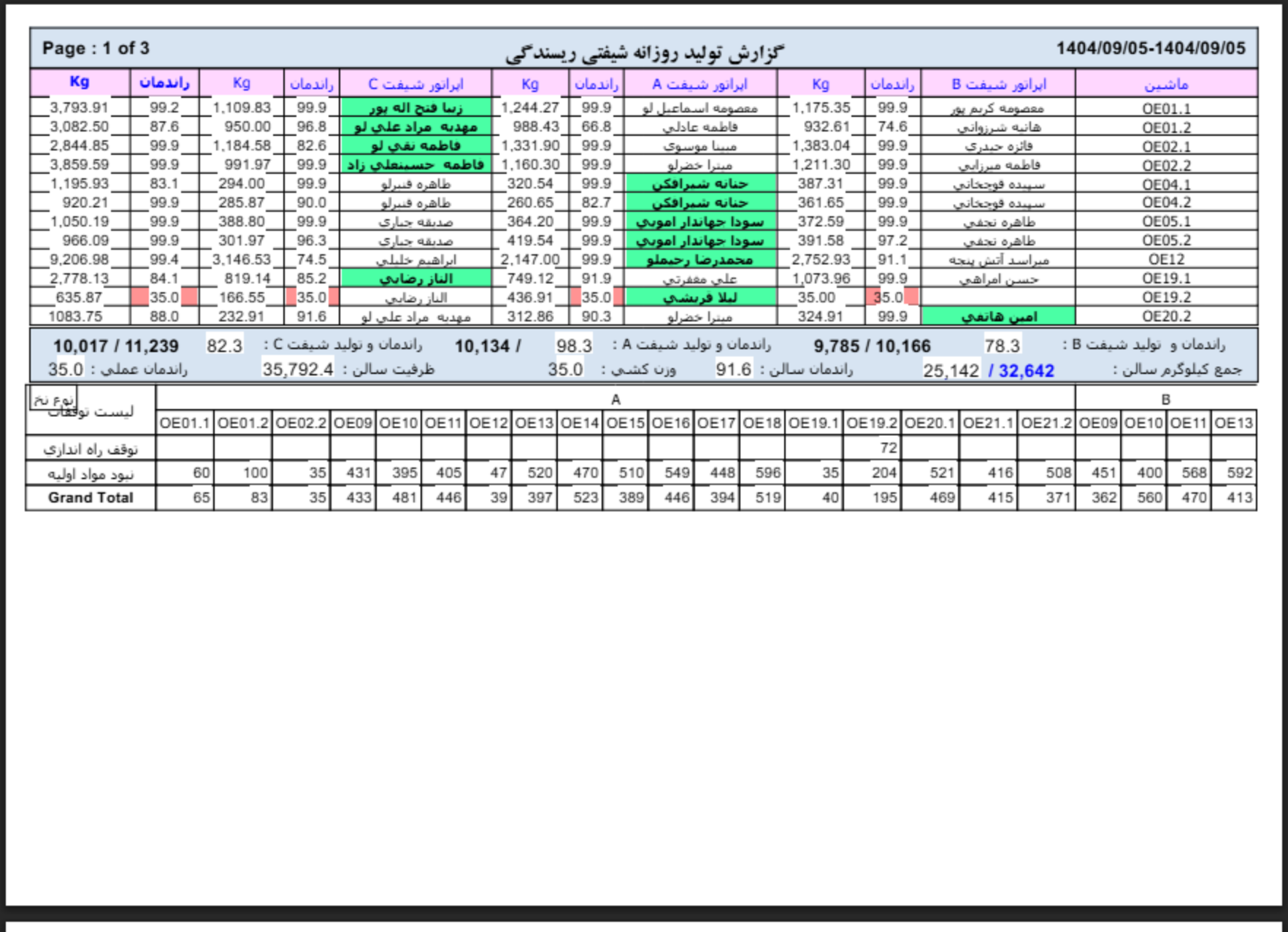
Each production machine is assigned a serial as a barcode, and at the end of every shift its actual output is recorded with an Android handheld. After scanning a machine’s barcode, settings such as speed, operator and product code are shown to the user; once production is recorded, efficiency is calculated and stored.
Managing production-staff performanceKey benefits of Fabrica Pro
Unified
Unified coding and data across the whole operation
Cross-platform
Windows + Web + Android
Accurate
Up-to-date, real-time information
User Friendly
Easy, effortless data entry for operators
Live demo
See the software
in action
No install — see right here how it works
Dashboard — Today
Today’s output (kg)
12,450
▲ 8% vs. yesterdayInventory (kg)
84,200
▲ 2% vs. yesterdayProduction efficiency
94%
▲ 3% vs. yesterdayMachine efficiency — this week (%)
Recent activity
Pallet P-047 received into warehouse
2 min ago
Sales invoice #1204 issued
8 min ago
Machine M-12 started its shift
1 hr ago
Yarn order dispatched from warehouse
2 hr ago
Why Fabrica Pro
Why factories trust Fabrica Pro
Hall scan by the shift lead
Module results
Labeling
Automatic barcode
Active
Product warehouse
Pallet scan
Active
Production efficiency
15 min / hall
Calculated
20
years of distinguished experience in the textile industry
5
minutes to read a summary report of the whole factory
100%
data integration
0%
errors in product gate-out
For factory managers
Fabrica Pro for factory managers
Managers can check live inventory, sales, trims and the previous day’s production from the web console without being on site. They can also approve purchase, gate-out and other requests via the console or Telegram.
Fabrica Pro modules
Specialized textile modules
Sample management report
What the manager sees in the web console
Fabrica Pro | Sample management report (demo)
Textile factory management dashboard
Report ID
#NX-7782
Module
Production efficiency
Status
Demo / sample
Platform
Android (tablet)
Hall
Spinning — morning shift
Status
Demo / sample
Shift efficiency summary
In 9 minutes the spinning shift lead scanned the barcodes of 96 machines and entered each machine’s output weight. The system calculated the efficiency of each machine and of the whole hall and produced the report.
Shift recording timeline
06:00 — Morning shift starts
The shift lead activated the Android tablet and began scanning machines
06:14 — Scanning complete
96 machines scanned, output weights entered, efficiency calculated
06:14 — Report in the console
The manager viewed the efficiency report from head office
Modules involved
Efficiency analysis
Machines running below 70% efficiency have been flagged. 5 machines need a technical check. The hall average is 82%.
Inventory summary (real-time)
Yarn inventory: 30 pallets (600 kg)
Last updated: just now, from the shared database.
Manager’s goals from the console
- See the efficiency of each hall and each machine
- Approve sales and purchase requests online
- Control inventory without being on site
Key performance indicators
Average output weight / machine nominal capacity
Below 70% efficiency — needs a technical check
Production profitability indicator
Manager action
The report is available from the web console — no need to be on site.
Note
Demo content for system validation. The data is not real. In the live version, reports are generated in real time from the shared database.
Fabrica Pro | Sample management report (demo)
Textile factory management dashboard
In 9 minutes the spinning shift lead scanned the barcodes of 96 machines and entered each machine’s output weight. The system calculated the efficiency of each machine and of the whole hall. Total efficiency: 82%.